Search

√

"I'm quite pleased with this collection. I own presets from several other companies and these are my new favorites! Well done." - John R.

√

"OMG these are amazing. I had never used overlays until now but now I'll never be able to look back." Sarah I

New
Sale

Luxe Indoor Family & Newborn Lightroom Presets & AI Tools – Desktop & Mobile

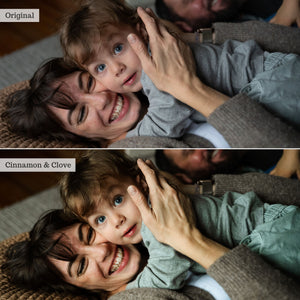
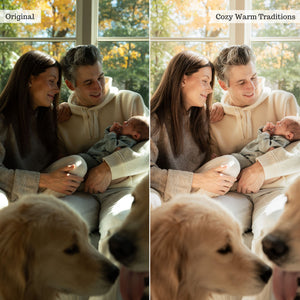
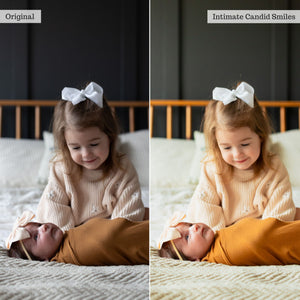
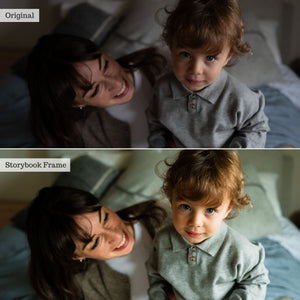
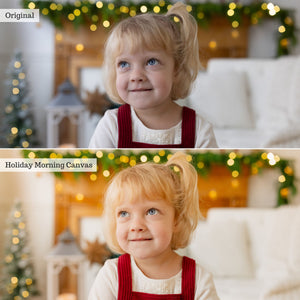
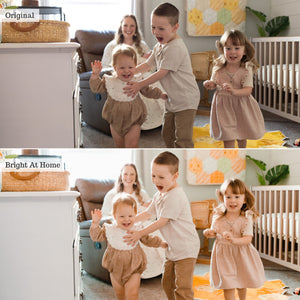
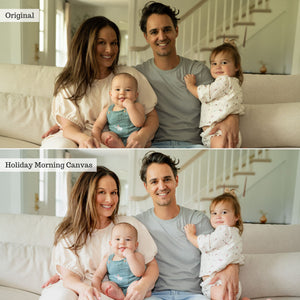
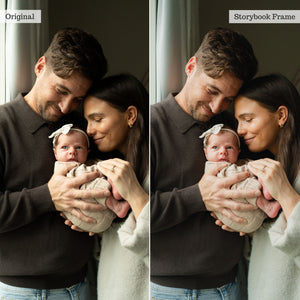
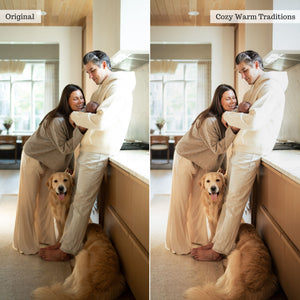
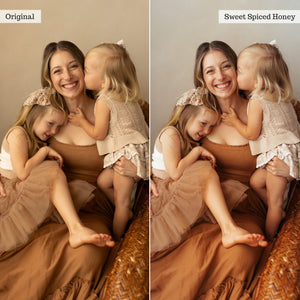
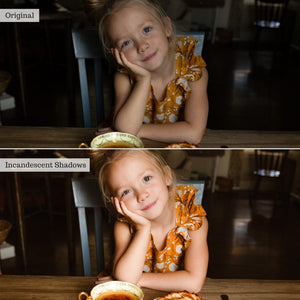
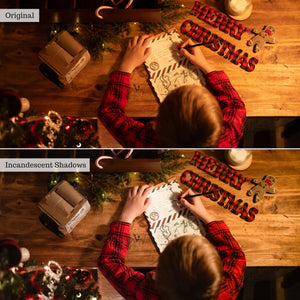
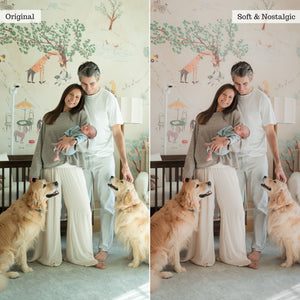
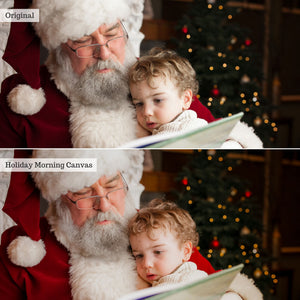
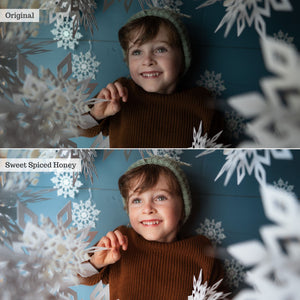
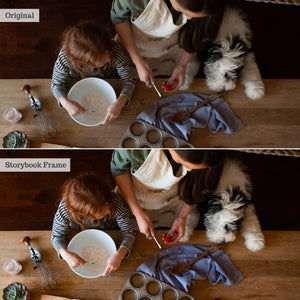
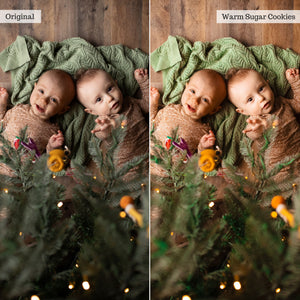
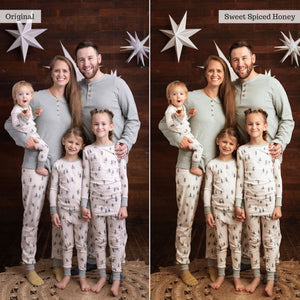
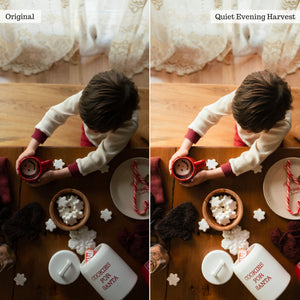
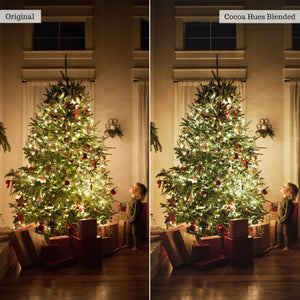
Our love letter to indoor family and newborn sessions is your new secret weapon for mastering tricky indoor light. Designed for everything from in-home intimate moments and cozy newborns to holiday traditions and styled studio sessions, Luxe Indoor Family & Newborn delivers timeless clean pro looks and modern editorial options. With 33 global looks and 31 powerful-localized AI-powered tools, you can effortlessly balance tricky indoor light, smooth baby skin, and turn color-casty indoor shots into stunning, gallery-ready portraits.

Compatible With:

Lightroom 9+

Lightroom Classic 15+

Photoshop 27+

Lightroom Mobile

Instant digital download · One-time purchase · Lifetime access
Real moments. Delicate details. Perfected indoor light.

As seasons and trends shift, indoor family and lifestyle sessions are in high demand, yet indoor lighting remains one of the hardest environments to edit. Luxe Indoor Family & Newborn is engineered to turn tricky room light, harsh shadows, and ambient color casts into clean, luminous, gallery-ready portraits.

Whether your subjects are bathed in natural window sun, warm lamplit glow, off-camera flash, or unpredictable mixed ambient light, you deserve indoor edits you’ll be proud to share! This collection pairs versatile global looks with targeted AI retouching tools fine-tuned to flatter authentic personalities, soft baby skin, and cozy, real-feel moods across every home setting.

Start with clean, authentic indoor tone

Build your edit with 33 global presets thoughtfully tuned for lighting balance, gentle color accuracy, built-in lift, and modern editorial flair. Engineered with subtle noise reduction to keep low-light room captures clean and smooth, the collection includes timeless clean pro looks, rich cozy finishes, and 5 brand-new, newborn-specific global presets designed to handle delicate baby skin, soft swaddles, and intimate lifestyle details.

Instant color correction, targeted light control, & effortless newborn retouching

Layer 31 localized color, light, and AI-powered adaptive tools over your chosen preset to effortlessly balance, lift, and sculpt images captured in tricky light. Use "Brighten Up" tools and instant white balance corrections to establish a clean starting point, then fine-tune subtle color shifts across living rooms, cozy nursery setups, holiday gatherings, and styled studio environments.

Skip feeling deflated over color-casty crib captures, shadow-heavy room snaps, or dull couch portraits.

This expanded offering introduces 3 specialized newborn AI retouch tools: Newborn Eye + Lip Enhance, Skin Milky, and Skin Repair—allowing you to soothe red or flaky baby skin, brighten tiny features, refine delicate skin texture, and balance indoor light without flattening natural dimension or spending hours in Photoshop.

Detailed portrait control when you want it

Lightroom Classic users receive 20 targeted Local Adjustment Brushes for precise, hands-on enhancements. From fine-tuning exposure and recoverability with dedicated shadow lifters, highlight boosters, and noise reducers, to softening distracting color casts in reds, oranges, or greens, you have complete control over every inch of your frame. Instantly apply custom dodge & burn, adjust room temperature, refine clarity, or add subtle dark and light vignettes to draw focus straight to your subjects. A comprehensive PDF User Guide is also included to walk you through installation, workflow tips, and best practices for editing indoor light.

Don’t wait ‘til spring for images that sing! Get looks that last, with Luxe Indoor Family & Newborn.

Before you begin

Luxe Indoor Family & Newborn is offered in XMP format for up-to-date subscription versions of Lightroom (CC), Lightroom Classic, Photoshop's Adobe Camera Raw, and the paid version of Lightroom Mobile. AI feature compatibility depends on your application, version, and device; be sure to check compatibility details prior to purchase.

ⓘAI-powered adaptive presets and tools require compatible desktop software (Lightroom Desktop, Lightroom Classic, or Adobe Camera Raw) or the Premium paid Lightroom app on compatible iOS or Android mobile devices. Local Adjustment Brushes are designed specifically for Lightroom Classic on desktop.

For a closer look at the tools and how to use them, explore the full PDF guide.

Learn more about software compatibility or visit our help center for more information.

The collection

What's included

33 Indoor Family & Newborn Global Presets
31 AI Adaptive Presets and Tools
20 Local Adjustment Brushes (LR Classic only)
34 Page PDF Recipe Guide
View the full list

33 Global Presets

Baby Soft Snuggles, Bright At Home, Cherished Portrait, Cinnamon & Clove, Cocoa Hues Blended, Cotton Soft Details, Cozy Warm Traditions, Creamy Daylight Wash, Featherlight Bassinet, Festive Family Moments, Flash Filled Radiance, Gilded Memories, Glowing Window Light, Holiday Morning Canvas, Incandescent Shadows, Intimate Candid Smiles, Lamplit Golden Glow, Little Sweet Pea, Matte White Wash, Neutral Homestead, Newborn Bloom, Nursery Lullaby, Peaceful Hearthside, Precious Little One, Quiet Evening Harvest, Rustic Interior Moods, Soft & Nostalgic, Storybook Frame, Sweet Spiced Honey, Vanilla Bean Candle, Vintage Olive Palette, Warm Sugar Cookies, Weathered White Linens

31 AI Adaptive Presets and Tools

Brighten Up (+ Repair Green Cast, + Repair Magenta Cast, + WB Auto, + WB Clean, + WB Cool, + WB Warm), Color (Soften Blue Tones, Soften Green Tones, Soften Orange Tones, Soften Yellow Tones, True Browns, Warm Pulse), Light (Big Lift, Light Balance, Recover Highlights, Recover Shadows, Top Light Diffuser, Top Light Filter Cool, Top Light Filter Warm, Window Light Diffuser (L), Window Light Diffuser (R), Window Light Filter Cool (L), Window Light Filter Cool (R), Window Light Filter Warm (L), Window Light Filter Warm (R)), Crib Correct (Cool Light, Warm Light), Newborn (Eye & Lip Enhance, Skin Milky, Skin Repair), Repair Harsh Window Light

20 Local Adjustment Brushes (LR Classic only)

Brush (Clarity Booster, Clarity Softener, Exposure Brightener, Exposure Darkener, Highlight Recover, Highlight Booster, Noise Reducer, Shadow Darkener, Shadow Lifter), Color (Blue Softener, Green Softener, Orange Softener, Red Softener, Yellow Softener), Dodge & Burn (Dodge, Burn), Temp (Cooling, Warming), Vignette (Dark, Light)

Frequently Asked Questions

Presets are one-click configurations that apply 30–50 global adjustments instantly to achieve the look of hours of editing. They are compatible with Adobe Lightroom, Lightroom Classic, Photoshop (via ACR), and Lightroom Mobile. Exact version compatibility is listed on each product page. 

Actions are pre-recorded command sequences that automate complex edits. They can be stacked for dynamic results and save substantial time. Compatible with Photoshop or Photoshop Elements (select your format on the product page). 

Overlays are image layers (.jpeg or .png) blended over your photos to add creative effects like light leaks, rain, or bokeh. They work in any software supporting layers and blend modes, but are not compatible with Lightroom. 

LUTs (.CUBE format) apply instant cinematic color grades to raw video footage or photos. They work in most video editing suites and photo software that supports color lookup adjustment layers. 

For more details, read our complete guide comparing editing tools in the Help Center.

Software: Users must have at least one compatible software from Adobe in order to use this collection. Compatibility (with version info, is available on every product page). Confused? Check your compatibility HERE!  

Newer collections and collections including AI Adaptive Tools are offered in XMP format ONLY, and thus only compatible with more recent subscription software. 

  • Lightroom Classic (Monthly Subscription; PC or Mac) 
  • Lightroom (Cloud-based; monthly subscription; PC or Mac) 
  • Photoshop (Monthly subscription versions; PC or Mac)
  • Lightroom Premium Mobile App (Cloud-based; monthly subscription for iOS or Android) 

Note: AI Adaptive Presets, Tool Presets, and Certain Effects Presets may be excluded for some iOS devices. Additionally, AI Presets will only work in up-to-date subscription software. please be sure to read full product & compatibility info or reach out to our team with any questions prior to purchase! 

Earlier collections include LRTEMPLATE presets and are compatible with: 

  • Lightroom Classic 5.0 and later (and all monthly subscription versions; PC or Mac) 
  • Lightroom 1.0 and later (cloud-based; monthly subscription; PC or Mac) - 
  • Photoshop CS6; CC; 2020 and later (purchased or monthly subscription versions; PC or Mac)

We have combined professional retouching adjustments with smart masking powered by Adobe Sensei Artificial Intelligence for one-click localized retouching!! Our AI Effects Presets and Tools rely on AI to detect and map adjustments only to specific parts of your image (like teeth, skin, hair, clothing, background, and sky) via masking!

Our AI Adaptive Presets & “Effects” tools work just like general presets from your presets panel and can be applied in just one click! Be sure to check out the full guides on our Help Center!

Yes! AI Presets can now be used in all versions of the Premium, Subscription Lightroom Mobile app on modern, compatible devices. Android Compatibility - You can install & use AI presets directly in the Premium Lightroom App for Android. iOS/iPad Compatibility - You can import AI presets directly in the Premium Lightroom App for iPhone & iPad (on compatible iPads*) on current OS!  

*Compatible iPads have RAM capacity of 4 GB and include (earlier iPads will NOT support all AI tools):

  • iPhone XS/XS MAX and newer (excluding iPhone XR & SE2)
  • iPad 10th Gen and newer
  • iPad Air 4th Gen and newer
  • iPad Mini 6th Gen and newer
  • iPad Pro 2nd Gen and newer

You will receive access to your digital files immediately after your payment has been processed and your purchase has completed. 

On your order confirmation page, you should see an "Access Digital Content" link. Additionally, all customers will receive a download email immediately following purchase. 

If you did not receive a download email, please check your spam folder and the email address associated with your form of payment. You may also contact us at support@luxelens.com and we'll resend your email. We do send any products via mail - all delivery is digital. 

No! You can use Luxe presets on either a computer or a mobile device. While many photographers prefer editing on a larger desktop screen, Luxe presets can easily be used on your phone or tablet. In fact, our presets work seamlessly across both desktop and mobile, so you can edit wherever, and however, works best for you. 

*Certain Tool, Adaptive (AI), and Effects Presets may not function on older iPhones or iPads due device computing limitations. AI and Effects presets require the Premium app to function.

Yes! Now you can use global (full-image, traditional) presets to edit videos in Lightroom. View our detailed blog on the topic here. You cannot use AI Adaptive preset or Adaptive profiles on video clips. 

Additionally, we offer video LUTS for use in video editing software like Davinci Resolve, Adobe Premiere Pro, Final Cut Pro, Filmore, Speedgrade, After Effects, and many others.

We offer detailed installation instructions – video, illustrative, and written - within our online help center.

Our customer service team is here to help. We provide 1:1 personalized help that tackles any issue you may come across while using your presets. 

Reviews

Trusted by photographers.

Overall rating: 5.0 / 5 from 3 reviews.

AI Generated Review Summary

Summary topics

    Review topics: [].

    Review highlights

      Reviews

      lightroom presets

      "I've tried lot of different presets,this is one of my favorites so far"

      — Jody Y. (5/5)

      Easy to use

      "Love it so much. Make my editing process better"

      — Anna M. (5/5)

      Love love luxe presets

      "’m absolutely thrilled with the Luxe presets. They’re beautiful, versatile, and incredibly easy to adjust to suit any image. I love that each preset includes strength sliders, making it simple to fine‑tune the look exactly how you want it."

      — amanda f. (5/5)

      Q&A