Search

√

"I'm quite pleased with this collection. I own presets from several other companies and these are my new favorites! Well done." - John R.

√

"OMG these are amazing. I had never used overlays until now but now I'll never be able to look back." Sarah I

Sale

Landscape, Wildlife & Animals AI Adaptive Retouch Toolkit Lightroom Presets – Desktop & Mobile

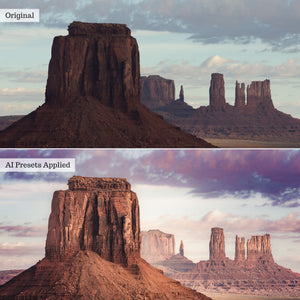
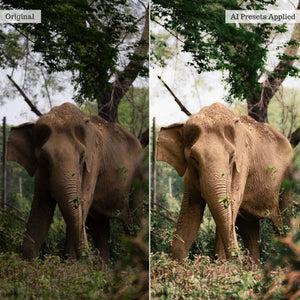
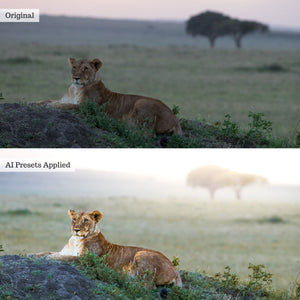
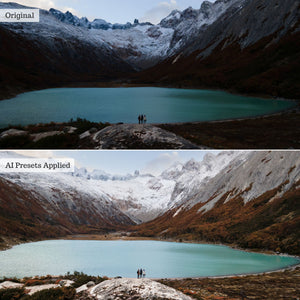
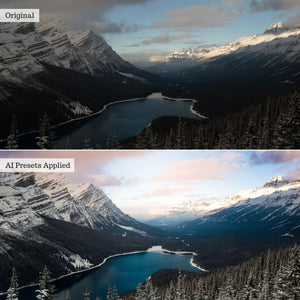
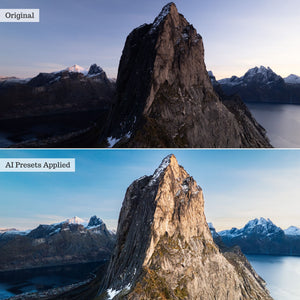
Targeted AI editing for landscapes, wildlife, pets, and every natural wonder. Transform specific subjects, skies, backgrounds, and landscape elements with 142 AI Adaptive presets. Correct difficult light and color, recover natural texture and detail, enhance mountains, snow, vegetation, and water, or add painterly atmosphere and creative light—all with stackable, adjustable tools designed for a faster workflow.

Compatible With:

Lightroom Classic 15+

Lightroom 9+

Photoshop 27+

LR Mobile (Premium)

Instant digital download · One-time purchase · Lifetime access

Nature is full of extraordinary detail. Now you can edit it with extraordinary precision.

Luxe Landscape, Wildlife & Animals AI brings intelligent, localized editing to nature, wildlife, and animal photography. Its 142 AI Adaptive presets use Adobe’s advanced detection capabilities to separately target subjects, backgrounds, skies, and individual landscape zones directly from your presets panel.

Whether you are photographing wilderness, wildlife, horses, birds, reptiles, insects, aquatic life, or familiar furry friends, this toolkit helps you correct challenging conditions, recover important detail, and enhance the natural character of the scene without applying every adjustment across the entire image.

Complete multi-zone edits in one tap

Begin with 12 Multi-Adaptive presets that apply professionally balanced combinations of targeted adjustments to multiple parts of the image at once. Choose a recipe developed for aquatic photography, dog parks, equestrian portraits, field and stream scenes, highland landscapes, insects, reptiles, safari wildlife, studio pets, colorful birds, wild horses, and more.

Each Multi-Adaptive preset provides a complete starting point while leaving you free to adjust its strength or layer additional tools for further refinement.

Edit the landscape zone by zone

Target architecture, artificial or natural ground, mountains, snow, vegetation, and water independently. Enhance or soften color and detail, balance highlights and shadows, refine seasonal hues, cool or warm foliage, and transform muddy or amber water into a range of natural and stylized blue tones.

Dedicated sky tools help recover clouds and detail, shift blues, enhance atmosphere, add drama, or introduce subtle color overlays without unnecessarily changing the land or subject beneath them.

Bring animal subjects to life

Refine color, texture, exposure, highlights, shadows, and fine detail specifically within detected subjects. Repair washed-out greys, restore true blacks, clean white details, neutralize unwanted green, orange, or yellow casts, and enhance the defining textures of fur, feathers, scales, and other natural features.

Correct, enhance, or get creative

Background tools help control haze, exposure, highlights, shadows, depth, seasonal color, and atmosphere. Use them to create softer bokeh, a painterly finish, stronger visual depth, or a more cohesive relationship between the subject and its surroundings.

Creative effects introduce directional halos, foreground and background light gradients, solar glow, early golden sunsets, late pastel sunsets, and targeted vignettes. Finish the complete image with grain, noise reduction, sharpening, temperature, clarity, color, contrast, tonal curves, or color overlays.

Stackable, adjustable, and batch-ready

Apply each preset independently, combine multiple targeted tools into a custom workflow, or begin with a Multi-Adaptive recipe and continue refining individual zones. Compatible presets support Lightroom’s Amount slider and can be synchronized across similar images for faster, more consistent editing.

A 41-page PDF Recipe Guide is included with detailed instructions, workflow recommendations, and editing examples.

Before you begin

AI Adaptive presets require compatible, up-to-date subscription versions of Lightroom, Lightroom Classic, or Photoshop Adobe Camera Raw. On mobile, these presets require the Premium paid Lightroom app on a compatible newer Android or iOS device.

For complete requirements, please review our software compatibility information. For detailed instructions and example workflows, visit the Landscape, Wildlife & Animals AI guide.

The collection

What's included

142 AI Adaptive Presets
41 Page PDF Guide
View the full list

12 Adaptive Multi Presets

Aquatic Focus, Dog Park Adventures, Equestrian Elegance, Field & Stream, Furry Friends, Highland Mood, Insect Macro, Reptile Radiance, Safari Wildlife, Studio Paws, Vibrant Feathers, Wild Horses

22 Background Presets

  • Atmosphere: Lite Haze, Reduce Haze
  • Color Hues: Desaturated, Saturated
  • Lighting: Exposure Darkened, Exposure Lightened, Highs Boosted, Highs Reduced, Lows Darkened, Lows Lifted
  • Overlay Filters: Amber, Frost, Golden
  • Scenery Depth: Enhanced, Softened
  • Seasonal: Fall Tones, Spring Tones, Summer Tones, Winter Tones
  • Style: Dramatic Edge, Painterly Brush, Softened Bokeh

39 Landscape Presets

  • Architecture: Color Hues Boosted, Color Hues Softened, Details Boosted, Lighting Highlights Neutralized, Lighting Shadows Diffused
  • Artificial Ground: Color Hues Boosted, Color Hues Softened, Details Boosted, Details Softened
  • Natural Ground: Color Hues Boosted, Color Hues Softened, Details Boosted, Details Softened
  • Mountains: Color Hues Boosted, Color Hues Softened, Details Boosted, Details Softened, Lighting Highlights Neutralized, Lighting Shadows Diffused
  • Snow: Color Neutralized, Details Boosted
  • Vegetation: Color Hues Boosted, Color Hues Softened, Details Boosted, Details Softened, Greens Cooled, Greens Muted, Greens Warmed, Yellows Muted, Yellows Orangey
  • Water: Amber to Blue, Brown to Blue, Filmic Blue, Stormy Blue, True Blue, Color Hues Boosted, Color Hues Softened, Details Boosted, Details Softened

11 Sky Presets

  • Blues Shifted: Aqua, Navy, Pale, Vibrant
  • Atmosphere and Detail: Bright Atmosphere, Clouds Revived, Details Rescued, Dramatic Canopy
  • Overlays: Blue, Pastel, Warm

18 Subject Presets

  • Color Hues: Boosted, Softened
  • Color Neutralization: Greens, Oranges, Yellows
  • Details: Boosted, Softened, Texture Sharpened, Texture Softened
  • Lighting: Exposure Dimmed, Exposure Popped, Highlights Boosted, Highlights Neutralized, Shadows Defined, Shadows Diffused
  • Repair: True Blacks Revived, Washed Greys Defined, White Details Polished

22 Creative Effects

  • Golden Light Halo: Horizontal, Vertical
  • White Light Halo: Horizontal, Vertical
  • Background Light Gradient: Bottom-Up, Top-Down
  • Foreground Light Gradient: Bottom-Up, Top-Down
  • Solar Glow—Top Center: Horizontal, Vertical
  • Solar Glow—Top Left: Horizontal, Vertical
  • Solar Glow—Top Right: Horizontal, Vertical
  • Early Golden Sunset: Center, Left, Right
  • Late Pastel Sunset: Center, Left, Right
  • Vignette: Background, Foreground

18 Finishing Tools

  • Detail: Add Film Grain, Add Noise Reduction, Add Sharpening
  • Temperature: Cool, Pastel, Warm
  • Clarity: Enhanced, Softened
  • Colors: Desaturated, Saturated
  • Contrast: Boosted, Reduced
  • Curves: Bold Terrain, Filmic Views, Moody Horizon
  • Overlays: Cool, Peach, Warm

Also Included

  • 41-page PDF Recipe Guide

From the community

What photographers are saying

Feedback from a Luxe Lens customer

Frequently Asked Questions

Presets are one-click configurations that apply 30–50 global adjustments instantly to achieve the look of hours of editing. They are compatible with Adobe Lightroom, Lightroom Classic, Photoshop (via ACR), and Lightroom Mobile. Exact version compatibility is listed on each product page. 

Actions are pre-recorded command sequences that automate complex edits. They can be stacked for dynamic results and save substantial time. Compatible with Photoshop or Photoshop Elements (select your format on the product page). 

Overlays are image layers (.jpeg or .png) blended over your photos to add creative effects like light leaks, rain, or bokeh. They work in any software supporting layers and blend modes, but are not compatible with Lightroom. 

LUTs (.CUBE format) apply instant cinematic color grades to raw video footage or photos. They work in most video editing suites and photo software that supports color lookup adjustment layers. 

For more details, read our complete guide comparing editing tools in the Help Center.

Software: Users must have at least one compatible software from Adobe in order to use this collection. Compatibility (with version info, is available on every product page). Confused? Check your compatibility HERE!  

Newer collections and collections including AI Adaptive Tools are offered in XMP format ONLY, and thus only compatible with more recent subscription software. 

  • Lightroom Classic (Monthly Subscription; PC or Mac) 
  • Lightroom (Cloud-based; monthly subscription; PC or Mac) 
  • Photoshop (Monthly subscription versions; PC or Mac)
  • Lightroom Premium Mobile App (Cloud-based; monthly subscription for iOS or Android) 

Note: AI Adaptive Presets, Tool Presets, and Certain Effects Presets may be excluded for some iOS devices. Additionally, AI Presets will only work in up-to-date subscription software. please be sure to read full product & compatibility info or reach out to our team with any questions prior to purchase! 

Earlier collections include LRTEMPLATE presets and are compatible with: 

  • Lightroom Classic 5.0 and later (and all monthly subscription versions; PC or Mac) 
  • Lightroom 1.0 and later (cloud-based; monthly subscription; PC or Mac) - 
  • Photoshop CS6; CC; 2020 and later (purchased or monthly subscription versions; PC or Mac)

We have combined professional retouching adjustments with smart masking powered by Adobe Sensei Artificial Intelligence for one-click localized retouching!! Our AI Effects Presets and Tools rely on AI to detect and map adjustments only to specific parts of your image (like teeth, skin, hair, clothing, background, and sky) via masking!

Our AI Adaptive Presets & “Effects” tools work just like general presets from your presets panel and can be applied in just one click! Be sure to check out the full guides on our Help Center!

Yes! AI Presets can now be used in all versions of the Premium, Subscription Lightroom Mobile app on modern, compatible devices. Android Compatibility - You can install & use AI presets directly in the Premium Lightroom App for Android. iOS/iPad Compatibility - You can import AI presets directly in the Premium Lightroom App for iPhone & iPad (on compatible iPads*) on current OS!  

*Compatible iPads have RAM capacity of 4 GB and include (earlier iPads will NOT support all AI tools):

  • iPhone XS/XS MAX and newer (excluding iPhone XR & SE2)
  • iPad 10th Gen and newer
  • iPad Air 4th Gen and newer
  • iPad Mini 6th Gen and newer
  • iPad Pro 2nd Gen and newer

You will receive access to your digital files immediately after your payment has been processed and your purchase has completed. 

On your order confirmation page, you should see an "Access Digital Content" link. Additionally, all customers will receive a download email immediately following purchase. 

If you did not receive a download email, please check your spam folder and the email address associated with your form of payment. You may also contact us at support@luxelens.com and we'll resend your email. We do send any products via mail - all delivery is digital. 

No! You can use Luxe presets on either a computer or a mobile device. While many photographers prefer editing on a larger desktop screen, Luxe presets can easily be used on your phone or tablet. In fact, our presets work seamlessly across both desktop and mobile, so you can edit wherever, and however, works best for you. 

*Certain Tool, Adaptive (AI), and Effects Presets may not function on older iPhones or iPads due device computing limitations. AI and Effects presets require the Premium app to function.

Yes! Now you can use global (full-image, traditional) presets to edit videos in Lightroom. View our detailed blog on the topic here. You cannot use AI Adaptive preset or Adaptive profiles on video clips. 

Additionally, we offer video LUTS for use in video editing software like Davinci Resolve, Adobe Premiere Pro, Final Cut Pro, Filmore, Speedgrade, After Effects, and many others.

We offer detailed installation instructions – video, illustrative, and written - within our online help center.

Our customer service team is here to help. We provide 1:1 personalized help that tackles any issue you may come across while using your presets. 

Reviews

Trusted by photographers.

Overall rating: 4.9565215 / 5 from 23 reviews.

AI Generated Review Summary

Summary topics

    Review topics: ["presets"].

    Review highlights

      Reviews

      Landscape, Wildlife & Animals AI Adaptive Retouch Toolkit Lightroom

      "I like the Preset and use it for my Wildlifephotos"

      — Leonard V. (4/5)

      Makes animal rescue photos POP!

      "These are great and really help improve the flow while working with getting our photos ready to post."
      — Linda M. (5/5)

      Love!

      "These presets are so great. I love them, helped elevate my wildlife photos."

      — Cheyenne U. (5/5)

      Great Preset

      "The preset is highly accessible for beginners and delivers excellent quality."

      — Nathaniel B. (5/5)

      Wonderful presets

      "I use these on every photo I process. I highly recommend buying and using LUX Lens presets."

      — Judy B. (5/5)

      Perfect

      "These presets are perfect for any photographer, pro or hobbyist,. Easy to download and easy to adjust."

      — Carla W. (5/5)

      A perfect companion for my

      "A perfect companion for my work. Highly recommended."

      — Stefan B. (5/5)

      A useful set of adaptable preset

      "Really like that you ar able to go into each layer mask and see what is happening and the changes it makes, and then able to personalise the masks."

      — Sharon B. (5/5)

      Very great!

      "Great presets! Saves a lot of editing time and the results are very great!"

      — Alexander H. (5/5)

      Excellent presets

      "This is the first time I have downloaded and used presets. Instructions were easy to follow and the results are powerful - yet realistic. Will be ordering more."

      — Sheila M. (5/5)

      Q&A