Search

√

"I'm quite pleased with this collection. I own presets from several other companies and these are my new favorites! Well done." - John R.

√

"OMG these are amazing. I had never used overlays until now but now I'll never be able to look back." Sarah I

Sale

Luxe Wedding Pro AI Adaptive Retouch Toolkit Lightroom Presets – Desktop & Mobile

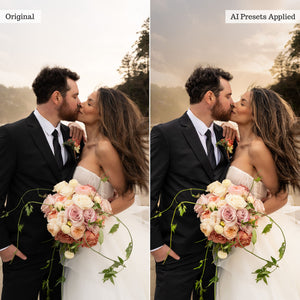
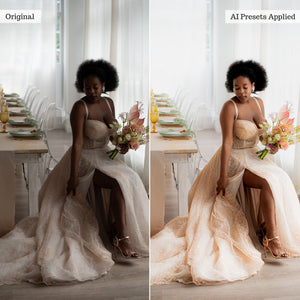
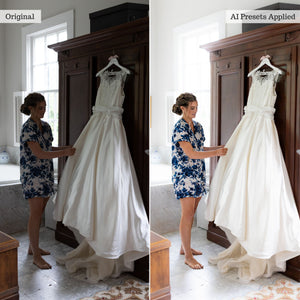
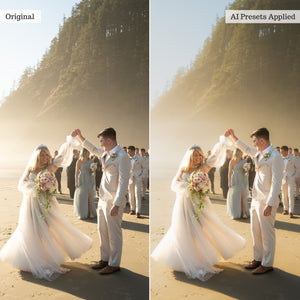
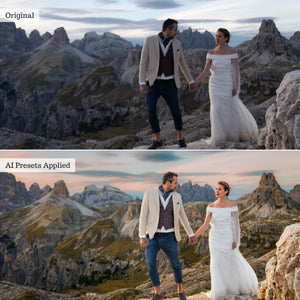
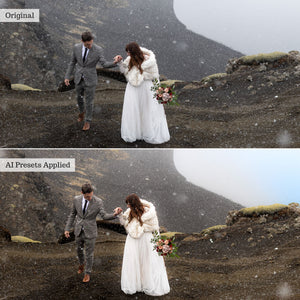
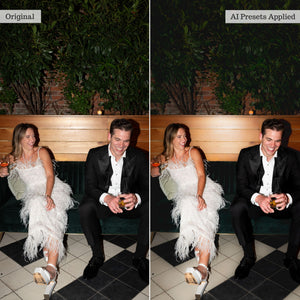
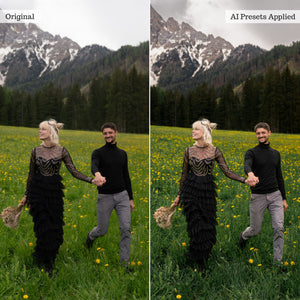
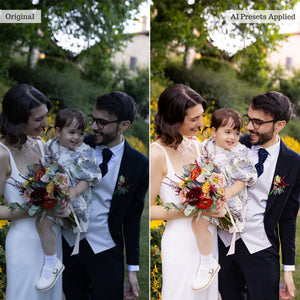
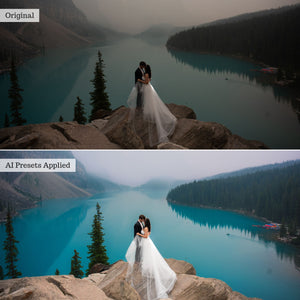
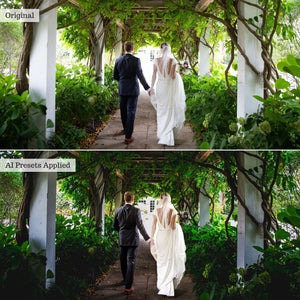
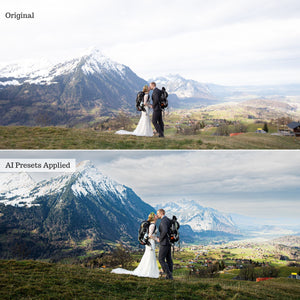
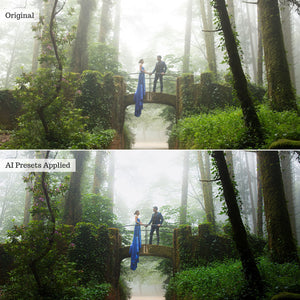
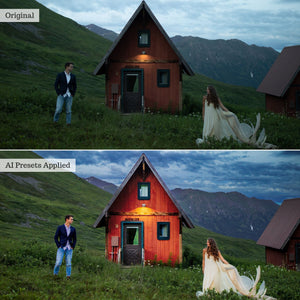
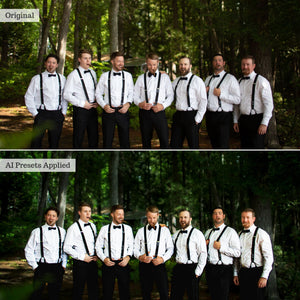
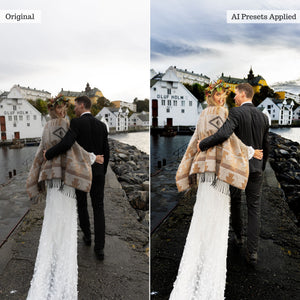
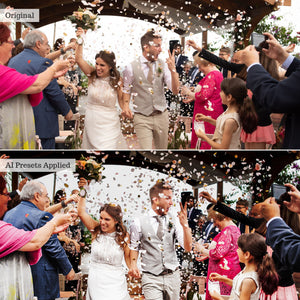
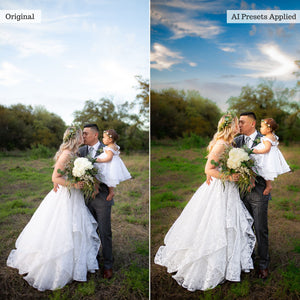
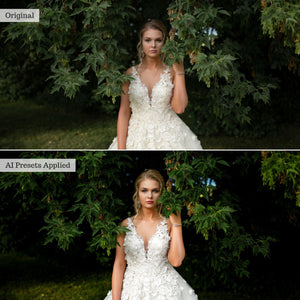
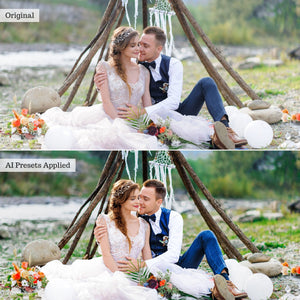
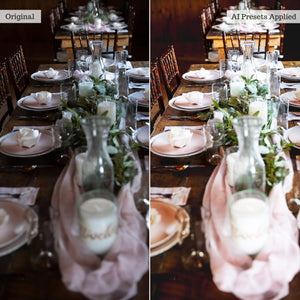
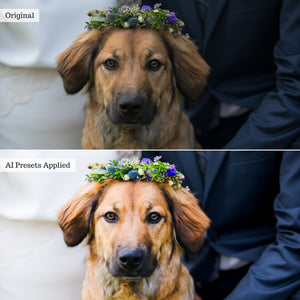
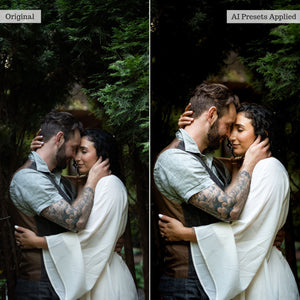
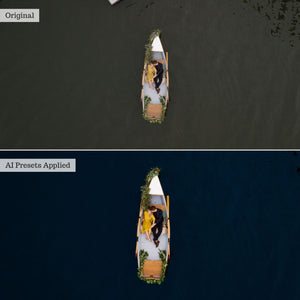
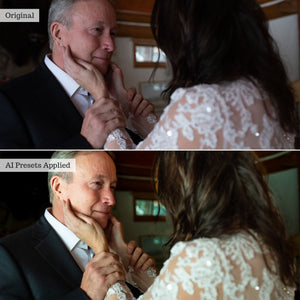
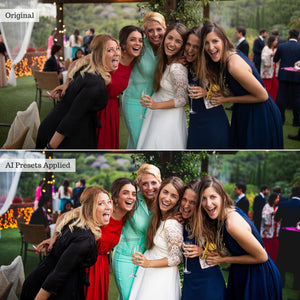
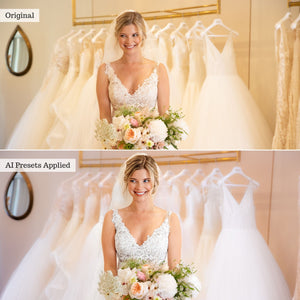
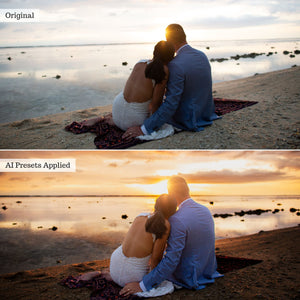
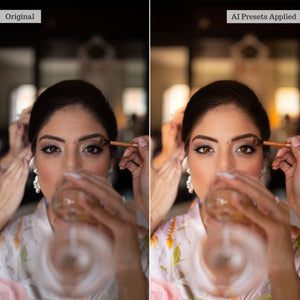
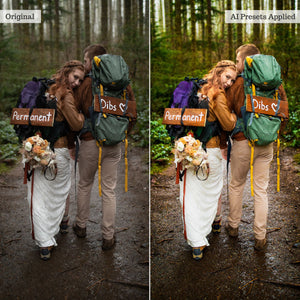
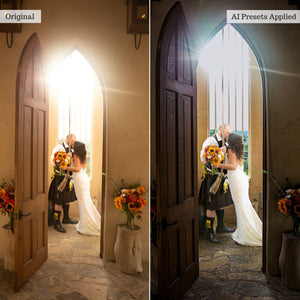
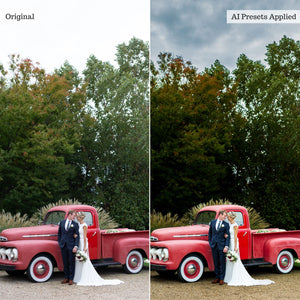
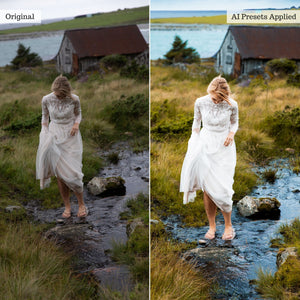
Your complete AI-powered wedding retouching workflow. Perfect every part of the wedding day with 192 targeted AI Adaptive presets and 16 one-tap editing recipes. Correct challenging venue light, transform skies and backgrounds, refine clothing, skin, eyes, hair, lips, and teeth, or add a romantic finishing touch—all with stackable, adjustable tools designed to complement your signature editing style.

Compatible With:

Lightroom Classic 15+

Lightroom 9+

Photoshop 27+

LR Mobile (Premium)

Instant digital download · One-time purchase · Lifetime access

Fall in love with a faster, more intelligent wedding-editing workflow.

Luxe Wedding Pro AI brings together 192 targeted AI Adaptive presets created for the beauty, emotion, and constantly changing conditions of a wedding day. From a softly lit bridal suite and sun-drenched outdoor ceremony to a dark reception or dramatically flashed dance-floor portrait, this comprehensive toolkit helps you retouch, correct, and enhance important client images without rebuilding every adjustment manually.

Each preset combines expertly developed settings with Adobe’s intelligent masking technology, allowing it to detect and adjust specific parts of your image directly from the presets panel.

Built for every part of the wedding day

Correct difficult venue lighting, reduce interior noise, soften or sharpen backgrounds, recover detail, transform skies, and bring depth or atmosphere to the complete scene. Specialized architecture and flooring tools provide even greater control over the churches, ballrooms, reception spaces, city streets, and outdoor venues surrounding your subjects.

Whether you are editing a surprise proposal, intimate elopement, traditional ceremony, formal portrait session, or energetic reception, Wedding Pro AI gives you targeted solutions for the lighting and environmental challenges that come with the moment.

Refine every person and detail

Enhance bridal dresses, tuxedos, and wedding-party attire while independently refining eyebrows, irises, eye whites, facial hair, hairstyles, lips, teeth, face skin, and body skin. Whole-subject tools help adjust exposure, color, clarity, softness, saturation, and directional reflector light without affecting the entire scene.

From natural skin softening and blemish reduction to polished hair, brighter smiles, expressive eyes, luminous subjects, and creative beauty effects, every tool is designed to target a particular area while preserving creative control.

Complete edits with 16 one-tap recipes

The Wedding Pro AI Recipe Kit combines multiple targeted adjustments into 16 professionally balanced formulas. Apply a coordinated edit for the bridal suite, groom suite, ceremony, reception, dance floor, flashed portraits, wedding party, family formals, or newlywed portraits in a single tap.

Choose from moment-specific, portrait-focused, and stylistic recipes—including Filmic, Light & Airy, and Moody—then adjust the result to suit your image and personal editing style.

Designed to complement your signature look

Wedding Pro AI is a targeted retouching toolkit rather than a traditional collection of full-image color presets. Apply its tools before or after your preferred global preset or custom color edit. Use one tool independently, stack several for a detailed retouch, or begin with a Recipe Kit preset and customize the result from there.

Compatible presets support Lightroom’s Amount slider, while the resulting masks remain available for further adjustment. Similar edits can also be synchronized across compatible images to help create a faster and more consistent client workflow.

A 57-page PDF Recipe Guide is included with instructions, tips, and example workflows for desktop and mobile editing.

Before you begin

AI Adaptive presets require compatible, up-to-date subscription versions of Lightroom, Lightroom Classic, or Photoshop Adobe Camera Raw. Because this collection relies on Adobe’s latest masking and subject-detection capabilities, older perpetual software and the free Lightroom Mobile app are not compatible.

On mobile, these presets require the Premium paid Lightroom app and a compatible newer Android or iOS device.

For complete requirements, please review our software compatibility information. For detailed instructions and example workflows, visit the Wedding Pro AI guide.

The collection

What's included

192 AI Adaptive Presets
16 Recipe Presets
57 Page PDF Guide
View the full list

47 Scene & Sky Tools

  • Architecture: Enhance Colors, Enhance Details, Exposure Drop, Exposure Pop
  • Flooring: Enhance Details, Exposure Drop, Exposure Pop
  • Background: Clean & Cool, Clean & Natural, Clean & Pastel, Clean & Warm, Dramatic Boost, Dreamy Blur, Ethereal Glow, Filmy Fade, Harsh Light Fix, Hazed Light Filter, Interior Noise Reduction, Interior Light Correction, Light & Airy Tones, Moody Backdrop, Pastel Soft Filter, Scene Cooled, Scene Warmed, Sharpen Details, Soften Details, Tones Deep, Twilight Crisp, Urban Backdrop, Vibrant Pop
  • Sky: Clear Blue, Details Recovered, Dramatic Clouds, Dreamy Skies, Enchanting Dusk, Ethereal Haze, Golden Hour, Heavenly Glow, Intensify Colors, Luminous Twilight, Moody Atmosphere, Pastel Dreams, Serene Daybreak, Sharpen Details, Stormy Sky, Sunset Warmth, Vibrant Horizon

42 Clothing & Eye Tools

  • Clothing: Boost Groom Tuxedo, Boost Groomsmen Attire, Bridal Dress Brighten, Bridal Dress Pop, Casual Attire, Enhance Colors, Enhance Details, Exposure Pop, Exposure Drop, Sharpen Details, Soften Fabrics, Texture Boost
    Two clothing preset names are missing from the current page.
  • Eyebrows: Auburn Polish, Black Fade, Blonde Blend, Brown Softness, Gray Tone, Platinum Tinting, Plum Lift, Red Sophistication, Sharpen Details, Soft Enhance, Strong Enhance, Tones Softened
  • Iris: Captivating Light, Color Pop, Contrast Enhancement, Crystal Blue, Enchanting Emerald, Ethereal Violet, Golden Amber, Hazel Glow, Sapphire Sparkle, Sharpen Details, Smoky Intrigue, Subtle Iris Texture, Vivid Color & Depth
  • Sclera: Brighten Whites, Clear & Radiant, Eliminate Color Casts

55 Hair, Lip & Teeth Tools

  • Facial Hair: Ash Gray, Auburn Red, Black Texture, Coppery Ginger, Dark Chestnut, Groomed & Polished, Intensified Depth, Natural Brown, Sandy Blonde, Sharpen Details, Soften Beard, Stubble Defined, Subtle Fade, Texture Enhanced
  • Hair: Ash Blonde, Ash Brown, Beachy Tones, Blonde Honey, Bold Color Pop, Boost Shine, Caramel Highlights, Chocolate Brown, Deepen Dark Hair, Dramatic Ombre, Enhance Texture, Fiery Red, Golden Blonde, Jet Black, Mahogany Brown, Rich Brunette, Sharpen Details, Soft Waves, Tones Rich, Vibrant Highlights
  • Lips: Berry Tint, Brown Contour, Cocoa Rouge, Coral Glow, Deep Wine, Glossy Finish, Luminous Shine, Matte Red, Muted Mauve, Natural Enhancer, Nude Matte, Peachy Sheen, Pink Blush, Red Fusion, Rosy Nude, Satin Smooth, Sculpted, Sharpen Details, Soften Details
  • Teeth: Brightening, Whitening

48 Skin & Whole-Subject Tools

  • Body Skin: Brighten Highlights, Even Tone, Flawless Texture, Fresh & Dewy, Golden Hour Glow, Healthy Radiance, Indoor Repair, Naturally Soft, Porcelain Finish, Reduce Blemishes, Rosy Blush, Sharpen Details, Subtle Contouring, Sun-Kissed Glow
  • Face Skin: Brighten Highlights, Even Tone, Flawless Texture, Fresh & Dewy, Golden Hour Glow, Healthy Radiance, Indoor Repair, Naturally Soft, Porcelain Finish, Reduce Blemishes, Rosy Blush, Sharpen Details, Subtle Contouring, Sun-Kissed Glow
  • Whole Subject: Bold Boost Filter, Enhance Details, Ethereal Essence, Exposure Drop, Exposure Pop, Fresh & Natural, Increased Clarity, Indoor Noise Reduction, Light & Airy Lifted, Reflector Gold Bottom-Up, Reflector Gold Center, Reflector Gold Top-Down, Reflector Silver Bottom-Up, Reflector Silver Center, Reflector Silver Top-Down, Saturation Pop, Sharpen Details, Soften Glow, Vibrant Portrait
    One whole-subject preset name is missing from the current page.

16 Wedding Pro AI Recipe Presets

  • Moments: Bridal Suite, Groom Suite, The Ceremony—Indoor, The Ceremony—Outdoor Sun, The Ceremony—Outdoor Shade, The Reception—Cocktail Hour, The Reception—Dance Floor, The Reception—Dinner & Toasts, Flashed Photos
  • Portraits: Bride & Bridesmaid, Groom & Groomsmen, The Newlyweds, Wedding Party & Family
  • Style: Filmic, Light & Airy, Moody

Also Included

  • 57-page PDF Recipe Guide

From the community

What photographers are saying

Feedback from a Luxe Lens customer

Frequently Asked Questions

Presets are one-click configurations that apply 30–50 global adjustments instantly to achieve the look of hours of editing. They are compatible with Adobe Lightroom, Lightroom Classic, Photoshop (via ACR), and Lightroom Mobile. Exact version compatibility is listed on each product page. 

Actions are pre-recorded command sequences that automate complex edits. They can be stacked for dynamic results and save substantial time. Compatible with Photoshop or Photoshop Elements (select your format on the product page). 

Overlays are image layers (.jpeg or .png) blended over your photos to add creative effects like light leaks, rain, or bokeh. They work in any software supporting layers and blend modes, but are not compatible with Lightroom. 

LUTs (.CUBE format) apply instant cinematic color grades to raw video footage or photos. They work in most video editing suites and photo software that supports color lookup adjustment layers. 

For more details, read our complete guide comparing editing tools in the Help Center.

Software: Users must have at least one compatible software from Adobe in order to use this collection. Compatibility (with version info, is available on every product page). Confused? Check your compatibility HERE!  

Newer collections and collections including AI Adaptive Tools are offered in XMP format ONLY, and thus only compatible with more recent subscription software. 

  • Lightroom Classic (Monthly Subscription; PC or Mac) 
  • Lightroom (Cloud-based; monthly subscription; PC or Mac) 
  • Photoshop (Monthly subscription versions; PC or Mac)
  • Lightroom Premium Mobile App (Cloud-based; monthly subscription for iOS or Android) 

Note: AI Adaptive Presets, Tool Presets, and Certain Effects Presets may be excluded for some iOS devices. Additionally, AI Presets will only work in up-to-date subscription software. please be sure to read full product & compatibility info or reach out to our team with any questions prior to purchase! 

Earlier collections include LRTEMPLATE presets and are compatible with: 

  • Lightroom Classic 5.0 and later (and all monthly subscription versions; PC or Mac) 
  • Lightroom 1.0 and later (cloud-based; monthly subscription; PC or Mac) - 
  • Photoshop CS6; CC; 2020 and later (purchased or monthly subscription versions; PC or Mac)

We have combined professional retouching adjustments with smart masking powered by Adobe Sensei Artificial Intelligence for one-click localized retouching!! Our AI Effects Presets and Tools rely on AI to detect and map adjustments only to specific parts of your image (like teeth, skin, hair, clothing, background, and sky) via masking!

Our AI Adaptive Presets & “Effects” tools work just like general presets from your presets panel and can be applied in just one click! Be sure to check out the full guides on our Help Center!

Yes! AI Presets can now be used in all versions of the Premium, Subscription Lightroom Mobile app on modern, compatible devices. Android Compatibility - You can install & use AI presets directly in the Premium Lightroom App for Android. iOS/iPad Compatibility - You can import AI presets directly in the Premium Lightroom App for iPhone & iPad (on compatible iPads*) on current OS!  

*Compatible iPads have RAM capacity of 4 GB and include (earlier iPads will NOT support all AI tools):

  • iPhone XS/XS MAX and newer (excluding iPhone XR & SE2)
  • iPad 10th Gen and newer
  • iPad Air 4th Gen and newer
  • iPad Mini 6th Gen and newer
  • iPad Pro 2nd Gen and newer

You will receive access to your digital files immediately after your payment has been processed and your purchase has completed. 

On your order confirmation page, you should see an "Access Digital Content" link. Additionally, all customers will receive a download email immediately following purchase. 

If you did not receive a download email, please check your spam folder and the email address associated with your form of payment. You may also contact us at support@luxelens.com and we'll resend your email. We do send any products via mail - all delivery is digital. 

No! You can use Luxe presets on either a computer or a mobile device. While many photographers prefer editing on a larger desktop screen, Luxe presets can easily be used on your phone or tablet. In fact, our presets work seamlessly across both desktop and mobile, so you can edit wherever, and however, works best for you. 

*Certain Tool, Adaptive (AI), and Effects Presets may not function on older iPhones or iPads due device computing limitations. AI and Effects presets require the Premium app to function.

Yes! Now you can use global (full-image, traditional) presets to edit videos in Lightroom. View our detailed blog on the topic here. You cannot use AI Adaptive preset or Adaptive profiles on video clips. 

Additionally, we offer video LUTS for use in video editing software like Davinci Resolve, Adobe Premiere Pro, Final Cut Pro, Filmore, Speedgrade, After Effects, and many others.

We offer detailed installation instructions – video, illustrative, and written - within our online help center.

Our customer service team is here to help. We provide 1:1 personalized help that tackles any issue you may come across while using your presets. 

Reviews

Trusted by photographers.

Overall rating: 5.0 / 5 from 21 reviews.

AI Generated Review Summary

Summary topics

    Review topics: ["presets","enhancements"].

    Review highlights

      Reviews

      Don’t regret it.

      "I’m really happy with my purchase of the Luxe Wedding Pro AI Adaptive presets. They are easy to use and give my wedding photos a beautiful, professional look while still allowing me to make my own adjustments. The presets have definitely helped speed up my editing workflow and give me a great starting point for each image. So far, I don’t regret the purchase at all and I’m looking forward to using them on more of my wedding work. Highly recommended for photographers looking to improve their workflow and achieve consistent results."

      — Ron E. (5/5)

      wonderful.

      "I really love the presets, I love that they're noticeably different too instead of all the same, with a minor tweak"

      — Amber H. (5/5)

      Life Saver

      "It saves me for long hours sit and editing. Now I can enjoy my family life aswell."

      — Juri K. (5/5)

      Amazing presets

      "Prices were amazing and enhancements were awesome. There is no shipping so that’s great. You get it written in there. The presets are amazing and I love it."

      — Kristen D. (5/5)

      Awesome

      "awesome job at creating the AI Presets! I was very impressed with how each worked!"

      — Michael C. (5/5)

      Love these

      "3rd set of presets I’ve purchased! I love them all! Can’t wait to get more!"

      — Regina M. (5/5)

      Time Saving

      "Although I count myself as very confident in LrC and editing , I purchased these presets not really expecting them to be anything special . I was surprising impressed that I found myself using these which made my work flow so much faster. Great purchase ."

      — Fiona B. (5/5)

      Great Product

      "These presets have been a God send, it has really helped my editing process."

      — Cindy M. (5/5)

      Highly Recommend these LR Presets and Enhancments!

      "These LR presets have really sped up the editing process for a wedding we recently photographed. I sometimes make a few adjustments, but not always. Even making the adjustments, it is a great starting point. I really like the skin and face presets and enhancements. REALLY save time and do a great job. I would recommend, for sure."

      — Shari W. (5/5)

      Wedding AI

      "The Luxlens AI Wedding Photo Preset for Lightroom is a valuable addition to any wedding photographer’s toolkit. Its AI-powered features and ease of use make it a standout choice for enhancing wedding photos quickly and effectively. Whether you’re a seasoned professional or just starting out, this preset can help you achieve stunning results with minimal effort"

      — Lee B. (5/5)

      Q&A