Search

√

"I'm quite pleased with this collection. I own presets from several other companies and these are my new favorites! Well done." - John R.

√

"OMG these are amazing. I had never used overlays until now but now I'll never be able to look back." Sarah I

Sale

Luxe Sports Lightroom Presets & AI Tools – Desktop & Mobile

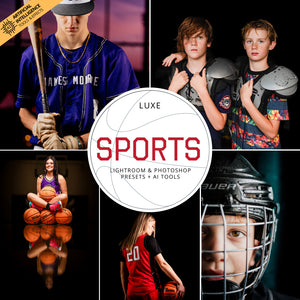
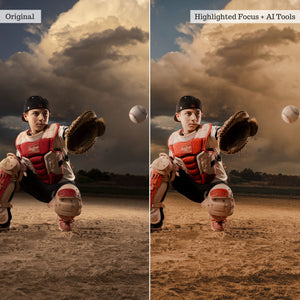
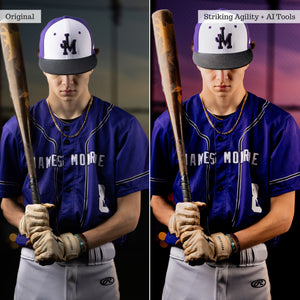
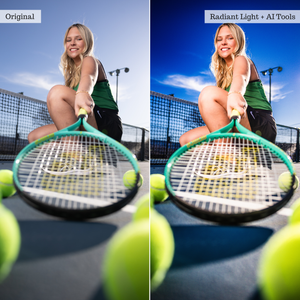
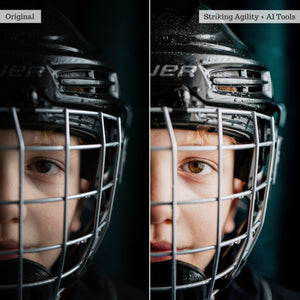
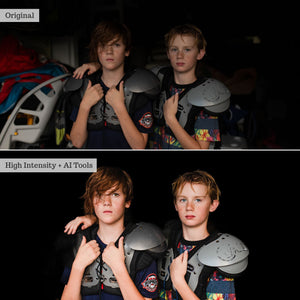
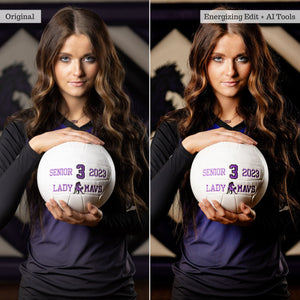
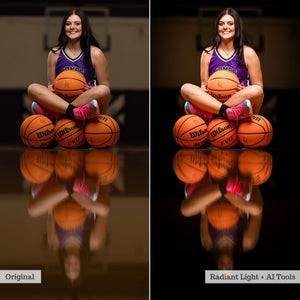
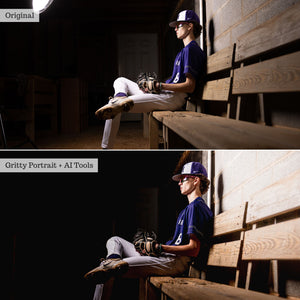
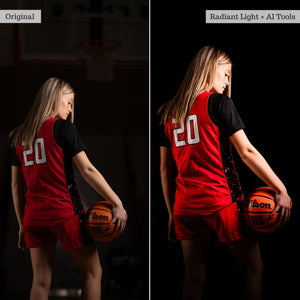
Made for the energy of the game. Luxe Sports combines 35 full-color presets, 46 AI-powered tools and effects, and 20 Lightroom Classic adjustment brushes to deliver bold, polished sports edits while preserving recognizable team colors and natural skin tones. Enhance live action, create high-impact athlete portraits, correct difficult lighting, and add atmospheric or practical-light effects with a fast, stackable workflow built for every level of the game.

Compatible With:

Lightroom Classic 13+

Lightroom 7+

Photoshop 25+

Lightroom Mobile

Instant digital download · One-time purchase · Lifetime access

Bring the energy of the game into every finished image. Luxe Sports gives you the color, contrast, atmosphere, and targeted retouching tools to create polished sports photographs without losing the team colors and skin tones that matter.

Built for everything from high-volume athlete portraits and childhood sports sessions to senior photography and live competition, this collection balances bold impact with flexible control. Apply a complete full-image look, layer targeted AI adjustments, or refine specific areas by hand in Lightroom Classic.

Whether you're creating a dramatic studio portrait or recovering a difficult frame from the sidelines, Luxe Sports helps you move through your edits quickly and consistently.

Color, energy, and impact.

Choose from 35 global presets developed to enhance the color, light, texture, and intensity of sports imagery. The collection moves between clean, vibrant finishes and more stylized looks with dramatic contrast, glowing light, atmospheric depth, and high-impact detail.

Use the presets across athlete portraits, senior sessions, team photography, live events, and youth sports while maintaining recognizable uniform colors and natural-looking skin tones.

Targeted tools for every play.

A 46-piece AI Adaptive Tool & Effects Toolkit gives you targeted control over backgrounds, skies, subjects, and lighting effects. Adjust background color and focus, add colored gels, introduce spotlights and strobes, strengthen atmosphere, recover skies, and refine skin, eyes, and teeth—all from your presets panel.

Each AI tool adapts to the areas detected in your photograph. Stack complementary adjustments, control their intensity, and sync your workflow across similar images for faster editing of larger galleries.

For hands-on Lightroom Classic editing, 20 Local Adjustment Brushes let you control exposure, contrast, color, temperature, skies, skin, eyes, texture, and vignettes exactly where you need them.

A 23-page Luxe Sports User Guide is included with practical tips, workflow guidance, and a complete sample edit.

Before you begin.

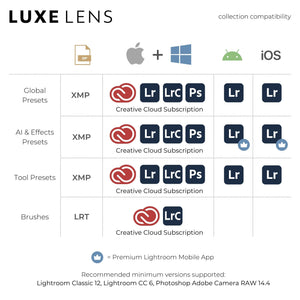
Luxe Sports is designed for compatible versions of Lightroom, Lightroom Classic, Photoshop's Adobe Camera Raw, and Lightroom Mobile. Available features depend on your application, subscription, and device. Please check full software compatibility before purchasing.

Mobile and brush compatibility: AI Adaptive presets require the Premium paid version of Lightroom Mobile and a compatible Android or newer iOS device. Local Adjustment Brushes are available only in Lightroom Classic for desktop.

For examples and instructions, explore the AI-Powered Toolkits guide.

The collection

What's included

35 Sports Presets For Desktop & Mobile
46 AI Adaptive Presets
20 Local Adjustment Brushes
23 Page Luxe Sports User Guide PDF
View the full list

35 Global Presets

  • Adrenaline Wash
  • Atmospheric Glow
  • Brilliant Spectacle
  • Bursting Energy
  • Champion Captures
  • Competitive Blend
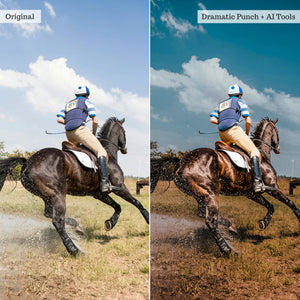
  • Dramatic Punch
  • Driving Clarity
  • Dynamic Focus
  • Electrifying Contrast
  • Energizing Edit
  • Focused Light
  • Graceful Victory
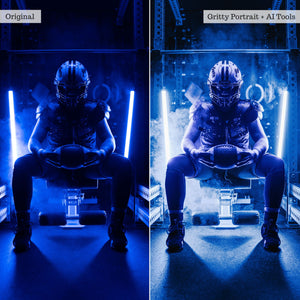
  • Gritty Portrait
  • HDR Spectrum
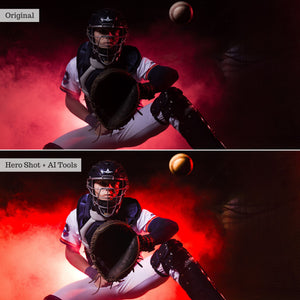
  • Hero Shot
  • High Intensity
  • Highlighted Focus
  • Impactful Dynamics
  • Live Action
  • Powerful Kick
  • Prism Rush
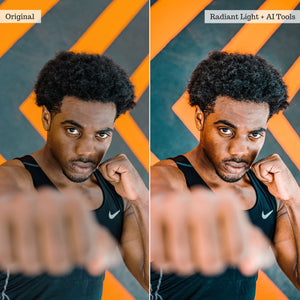
  • Radiant Light
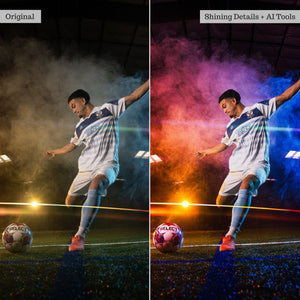
  • Shining Details
  • Spirited View
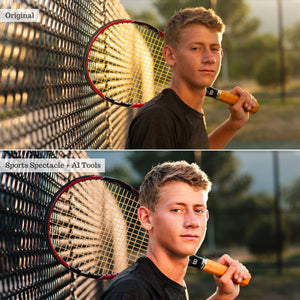
  • Sports Spectacle
  • Striking Agility
  • Swift Precision
  • Tranquil Spirit
  • Triumphant Tones
  • Vibrant Artistry
  • Victorious Aura
  • Vivacious Hues
  • Warm Celebration
  • Winning Moments

46 AI Adaptive Tools & Effects

  • Background Gels: Blue, Green, Orange, Purple, Red, Yellow
  • Background Color: Muted, Vibrant
  • Background Focus: Soften, Strengthen
  • Background Temperature: Cooling, Warming
  • Background Detail: Sharpen Details
  • Background Styles: Clean Edit, Dramatic Depth, Hazy Atmosphere, High Dynamic Range, Highlight Shimmer, Scenery Softened, Shaded & Hazed, Sunset Light, Total Blackout
  • Spotlight Effects: Center Horizontal, Center Vertical
  • Strobe Effects: Top Center, Top Left Center, Top Right Center
  • Strobe Effects With Vignette: Top Center, Top Left Center, Top Right Center
  • Sky Atmosphere: Aura Dehazed, Aura Hazed
  • Sky Color: Teal Cast, Warm Cast
  • Sky Drama: Soft, Strong
  • Face: Eyes Brighten & Whiten, Teeth Brighten & Whiten
  • Subject: Full Body Boost, Full Skin Soften
  • Gold Reflectors: Center, Left, Right
  • Silver Reflectors: Center, Left, Right

20 Local Adjustment Brushes

Lightroom Classic only.

  • Clarity & Texture: Decrease, Increase
  • Contrast: Booster, Softener
  • Dodge & Burn: Burn, Dodge
  • Exposure: Drop, Pop
  • Saturation: Boost, Reduce
  • Sky: Recover & Dramatize
  • Eyes: Boosted
  • Skin: Reduce Redness, Soften, Strengthen, Warming
  • Temperature: Cooling, Warming
  • Vignette: Dark, Light

Also Included

  • 23-page Luxe Sports User Guide PDF with tips, techniques, and a complete sample edit

See it in action

Collection overview

Explore what's included and see the tools at work.

From the community

What photographers are saying

Feedback from a Luxe Lens customer

Frequently Asked Questions

Presets are one-click configurations that apply 30–50 global adjustments instantly to achieve the look of hours of editing. They are compatible with Adobe Lightroom, Lightroom Classic, Photoshop (via ACR), and Lightroom Mobile. Exact version compatibility is listed on each product page. 

Actions are pre-recorded command sequences that automate complex edits. They can be stacked for dynamic results and save substantial time. Compatible with Photoshop or Photoshop Elements (select your format on the product page). 

Overlays are image layers (.jpeg or .png) blended over your photos to add creative effects like light leaks, rain, or bokeh. They work in any software supporting layers and blend modes, but are not compatible with Lightroom. 

LUTs (.CUBE format) apply instant cinematic color grades to raw video footage or photos. They work in most video editing suites and photo software that supports color lookup adjustment layers. 

For more details, read our complete guide comparing editing tools in the Help Center.

Software: Users must have at least one compatible software from Adobe in order to use this collection. Compatibility (with version info, is available on every product page). Confused? Check your compatibility HERE!  

Newer collections and collections including AI Adaptive Tools are offered in XMP format ONLY, and thus only compatible with more recent subscription software. 

  • Lightroom Classic (Monthly Subscription; PC or Mac) 
  • Lightroom (Cloud-based; monthly subscription; PC or Mac) 
  • Photoshop (Monthly subscription versions; PC or Mac)
  • Lightroom Premium Mobile App (Cloud-based; monthly subscription for iOS or Android) 

Note: AI Adaptive Presets, Tool Presets, and Certain Effects Presets may be excluded for some iOS devices. Additionally, AI Presets will only work in up-to-date subscription software. please be sure to read full product & compatibility info or reach out to our team with any questions prior to purchase! 

Earlier collections include LRTEMPLATE presets and are compatible with: 

  • Lightroom Classic 5.0 and later (and all monthly subscription versions; PC or Mac) 
  • Lightroom 1.0 and later (cloud-based; monthly subscription; PC or Mac) - 
  • Photoshop CS6; CC; 2020 and later (purchased or monthly subscription versions; PC or Mac)

We have combined professional retouching adjustments with smart masking powered by Adobe Sensei Artificial Intelligence for one-click localized retouching!! Our AI Effects Presets and Tools rely on AI to detect and map adjustments only to specific parts of your image (like teeth, skin, hair, clothing, background, and sky) via masking!

Our AI Adaptive Presets & “Effects” tools work just like general presets from your presets panel and can be applied in just one click! Be sure to check out the full guides on our Help Center!

Yes! AI Presets can now be used in all versions of the Premium, Subscription Lightroom Mobile app on modern, compatible devices. Android Compatibility - You can install & use AI presets directly in the Premium Lightroom App for Android. iOS/iPad Compatibility - You can import AI presets directly in the Premium Lightroom App for iPhone & iPad (on compatible iPads*) on current OS!  

*Compatible iPads have RAM capacity of 4 GB and include (earlier iPads will NOT support all AI tools):

  • iPhone XS/XS MAX and newer (excluding iPhone XR & SE2)
  • iPad 10th Gen and newer
  • iPad Air 4th Gen and newer
  • iPad Mini 6th Gen and newer
  • iPad Pro 2nd Gen and newer

You will receive access to your digital files immediately after your payment has been processed and your purchase has completed. 

On your order confirmation page, you should see an "Access Digital Content" link. Additionally, all customers will receive a download email immediately following purchase. 

If you did not receive a download email, please check your spam folder and the email address associated with your form of payment. You may also contact us at support@luxelens.com and we'll resend your email. We do send any products via mail - all delivery is digital. 

No! You can use Luxe presets on either a computer or a mobile device. While many photographers prefer editing on a larger desktop screen, Luxe presets can easily be used on your phone or tablet. In fact, our presets work seamlessly across both desktop and mobile, so you can edit wherever, and however, works best for you. 

*Certain Tool, Adaptive (AI), and Effects Presets may not function on older iPhones or iPads due device computing limitations. AI and Effects presets require the Premium app to function.

Yes! Now you can use global (full-image, traditional) presets to edit videos in Lightroom. View our detailed blog on the topic here. You cannot use AI Adaptive preset or Adaptive profiles on video clips. 

Additionally, we offer video LUTS for use in video editing software like Davinci Resolve, Adobe Premiere Pro, Final Cut Pro, Filmore, Speedgrade, After Effects, and many others.

We offer detailed installation instructions – video, illustrative, and written - within our online help center.

Our customer service team is here to help. We provide 1:1 personalized help that tackles any issue you may come across while using your presets. 

Reviews

Trusted by photographers.

Overall rating: 4.82 / 5 from 50 reviews.

AI Generated Review Summary

Summary topics

    Review topics: ["value","results","outcome","set","presets","tools","edits","effects","photos","saver","process"].

    Review highlights

      Reviews

      Sports Pre-sets

      "Excellent product"

      — Jorge C. (5/5)

      Love it

      "I bought few presets pack and I Love it! I'm waiting for automotive."
      — Tomasz K. (5/5)

      excelente

      "Los he estado usando y es bastante bueno los presets se ajustan a la foto sin muchos arreglos posteriores"

      — Javier C. (4/5)

      Love the options

      "Lots of filters to choose from. Fun to play with the pictures for different outcomes."

      — Michelle B. (4/5)

      Time Saver!

      "Definitely sped up my work flow. Lots of options to choose from."

      — Robert R. (5/5)

      Luv it

      "I love these presets, looking forward to others."

      — Shawn P. (5/5)

      Amazing

      "Loved these presets worth the money"

      — Kerry B. (5/5)

      Good investment

      "Great selection of presets and effects."

      — Sergio L. (5/5)

      A Must For Sports Photography

      "Best purchase I’ve made for sports photography! Most all of my pics were a quick 1 click edit using these incredible presets. I highly recommend them to anyone shooting sports photography. Thank you Luxe for providing me with the ability to focus on capturing the shot and not having to overthink the editing process. With these presets, I edit one pic and sync the others to it. Super easy and delivers amazing results."

      — Donna S. (5/5)

      Still trying to implement the

      "Still trying to implement the presets in my work."

      — Adrian J. (4/5)

      Q&A