Simply really good
"Simply really good"
Shop All & New
Shop by Product Type
Shop by Editing Styles
AI Retouch Toolkit Bundle
Our best selling AI Adaptive Preset collections bundled together.
Luxe Overlay Lightroom Presets
This Effects Bundle brings your favorite Luxe overlays to Lightroom.
"I'm quite pleased with this collection. I own presets from several other companies and these are my new favorites! Well done." - John R.
"OMG these are amazing. I had never used overlays until now but now I'll never be able to look back." Sarah I
Photoshop 25+
Photoshop (Older CS6+)
Elements (15+)
Important: Please select your software format from the dropdown above!
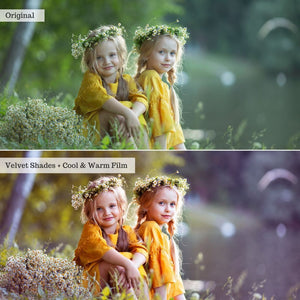
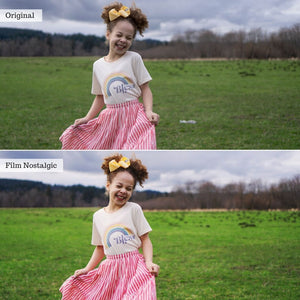
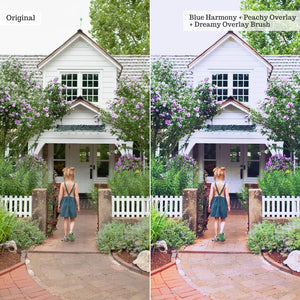
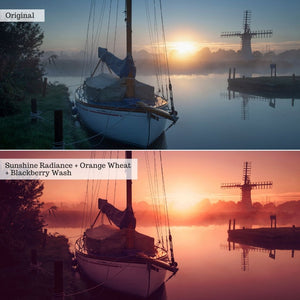
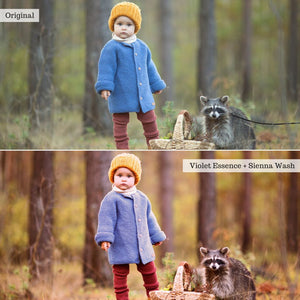
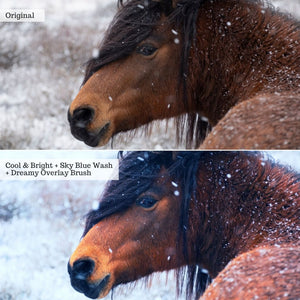
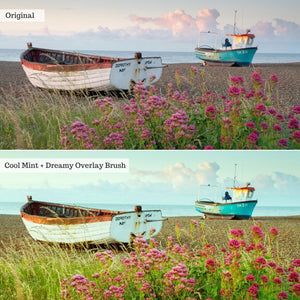
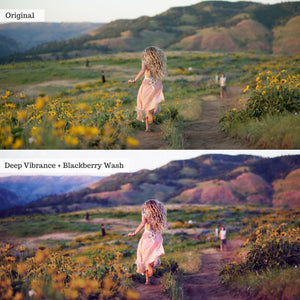
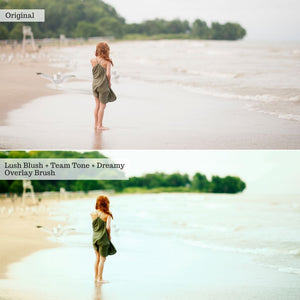
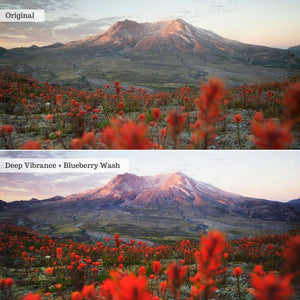
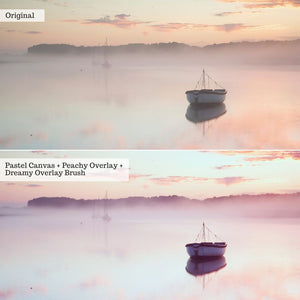
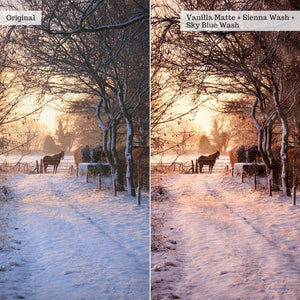
Spring is here, along with beautiful hues of yellow, green, pink, blue, and purple! Together, these sweet tones work to cleanse the palette of winter. This seasonally-themed collection of 43 actions celebrates spring with 20 color bases, 6 textured color overlays, 7 flat color overlays, 10 brushes, and the Luxe 40 action toolkit. The various bases, filters, actions, & final touches were designed to be stacked for diagnostic and personalized editing. Despite your forecast, this collection encourages you to live like it's spring. Together, these actions cast light upon the lamben, fresh, and radiant tones that surround you.
20 Color Bases
6 Color Washes (Textured Color Overlays):
Crimson, Rose, Sienna, Blackberry, Lemon, Sky Blue
7 Filter Overlays (Flat Color Overlays):
Warming, Cooling, Peachy, Pink, Purple, Teal, Green
10 Brushes:
Color Saturate, Color Desaturate, Light Increase, Light Decrease, Blur Subtle, Blur Heavy, Rich Overlay Subtle, Rich Overlay Heavy, Dreamy Overlay Subtle, Dreamy Overlay Heavy
Luxe 40 Action Toolkit
3 Quick Access Items: Duplicate Image, Flatten All Layers, Flatten All Layers to New Layer
21 General Workflow:Auto Histogram Fix, Exposure (Increase, Decrease), Contrast (Increase, Decrease), Depth Contrast, Highlight (Booster, Dimmer, Recovery), Midtone (Booster, Dimmer), Shadow (Booster, Cruncher, Recovery), Temperature (Warmer, Cooler), Saturation (Increase, Decrease), Haze (Add, Remove), Dodge & Burn
6 Grain Actions: Normal Grain (Low, Medium, High), Film Grain (Low, Medium, High)
10 Final Sharpening Actions: Basic & Pro LAB: Full Size, 2500px, 1500px, 750px, 72dpi (Web)
A big shout out to our featured photographers: Julie Jourden, Jessica Kelley, Megann Robinson, Natalie Gildersleeve, Justin Minns, Nathaniel Merz, and Anka Melnikova!
Presets are essentially a configuration of settings, designed to quickly achieve the look of hours of editing, making global changes with a single click. On average, our presets change 30-50 settings.
Actions are prerecorded sets of multiple software commands, that play one after the other, to make specific changes to an image. Actions can be stacked, so that one is run after the other, in order to create more dynamic edits. Actions are typically complex and because of this, the use of actions saves a user large amounts of time from having to make each change individually in order to achieve a desired outcome. Actions are designed for Photoshop, not Lightroom! Be sure to review compatibility prior to purchase!
Overlays consist of an image (.jpeg or .png) that sits on top of your original image as a layer, in order to enhance your image. The layers are often blended by the user to create a realistic composition. Overlays are multi-purpose and can come in many forms from seasonal (rain and rainbows, snow, fog, skies, and leaves), to everyday magic (glitter, light leaks, bokeh, confetti, and fairy dust)!
A LUT is a tool that allows filmmakers, editors, and colorists to apply specific color grades to film/video (raw log footage) or images. Our LUTs or color lookup tables are .CUBE format presets created to colorgrade film clips. These can be used in most video-editing software and any photo editing software that allows for adjustment layers targeting lookup tables for color grading. We've included some common programs below, but if you know your software can support .CUBE LUTs, then you can use these!
Users must have Photoshop (Creative Cloud Subscription; PC or Mac) software from Adobe in order to use this collection. Check your compatibility HERE! -
AI-powered actions are not backwards compatible and will not work in Elements as they utilize the latest software features powered by Adobe Sensei AI!
The core of our AI Actions collections are the Subject, background, and sky targeted actions which apply localized changes in the touch of a button! We have combined our professional retouching adjustments with smart masking powered by Adobe Sensei Artificial Intelligence to facilitate this one-click localized retouching for a super-charged workflow without sacrificing style or control!
Like our AI Adaptive Presets, our AI Actions are powered by Adobe Sensei AI! Sensei allows our pro settings to be mapped to your image-specific subject, background, or sky in just a click!
Directly from the Actions panel in your Photoshop workspace! No need to load plug-ins or edit in & out of camera raw!
NOPE! These will not use generative credits, as they utilize Adobe’s traditional machine-learning AI (Sensei), and not the generative AI (Firefly), to cleanly mask changes to specific parts of your image.
While these will play through like any other actions, we think these are best used in button mode! You can turn on “Button Mode” via the actions panel menu! See our guides for visuals! With button mode instead of pressing play for each action, you can just click through your workflow!
Unfortunately, no. Adobe has not designed their mobile iterations of Photoshop to support actions!
You will receive access to your digital files immediately after your payment has been processed and your purchase has completed.
On your order confirmation page, you should see an "Access Digital Content" link. Additionally, all customers will receive a download email immediately following purchase.
If you did not receive a download email, please check your spam folder and the email address associated with your form of payment. You may also contact us at support@theluxelens.com and we'll resend your email. We do send any products via mail - all delivery is digital.
Actions are easy to install as all of the actions are bundled into a single .ATN file! You can double-click on the unzipped .ATN file to automatically load it into Photoshop OR you can select “Load Actions” from your Actions window menu in Photoshop and load your ATN file that way!
Our customer service team is here to help. We provide 1:1 personalized help that tackles any issue you may come across while using your presets.
Overall rating: 4.75 / 5 from 4 reviews.
Review topics: [lens].
"Simply really good"
— Hartmut G. (5/5)
"I love the preset and it made my photo stunning."
— Alisha M. (5/5)
"this are my favourite, you can change look of the photos with one click. my favourithe is temperature warmer"
— Kamila D. (5/5)
"Everything works great but not sure I'd call it Painterly. Luxe Lens is a fantastic company -- I will buy again. Thanks for adding new things all the time."
— Jean S. (4/5)